
Answers for the TryHackMe Advent of Cyber Day 3, Even if I wanted to go, their vulnerabilities wouldn’t allow it. In this room, we learn about Logs, Elastic/ELK’s and how to KQL to query Elastic logs. As always, the room is available at: https://tryhackme.com/r/room/adventofcyber2024
- BLUE: Where was the web shell uploaded to?
Answer: /media/images/rooms/shell.php
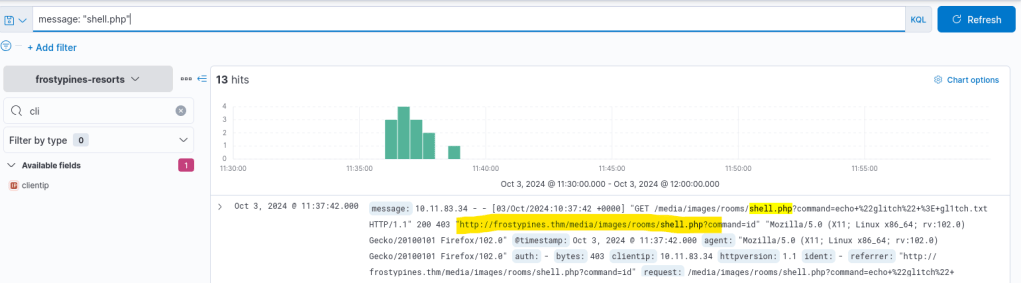
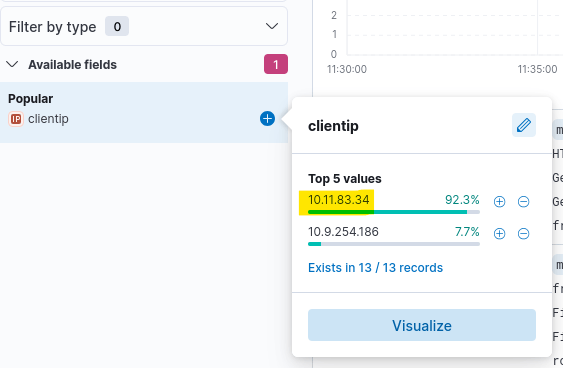
2. BLUE: What IP address accessed the web shell?
Answer: 10.11.83.34

3. RED: What is the contents of the flag.txt?
Answer: THM{Gl1tch_Was_H3r3}
- First you need to login to the site, use the login name admin@frostypines.thm and password admin. These came from the Weak Credentials section
- Then go to admin part of the frostpines.thm
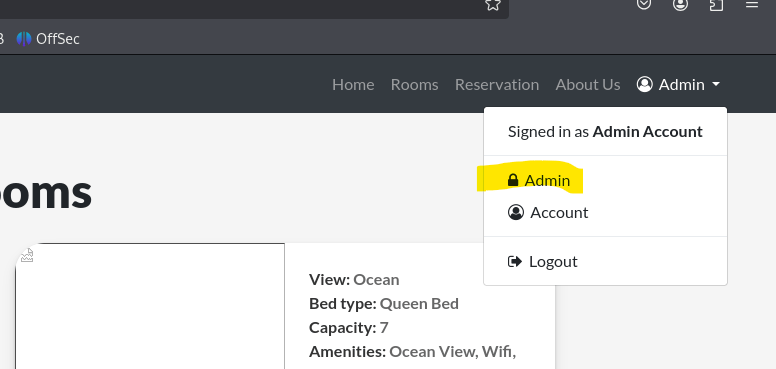
3. Then Click on Add new Room
4. Name the room whatever you want, then use the Browse button under room image to upload the shell.php file you created earlier. If you have not created this file, the details are in the Exploiting RCE via File Upload section
4. Right click on the blank space is where the room picture would be, and select open in new tab

5. Enter the command cat flag.txt


