

Answers for the TryHackMe Advent of Cyber Day 17: He analyzed and analyzed till his analyzer was sore! In today’s room, we learn about Splunk, how to query Splunk logs and how to use Splunk’s Search Processing Language to filter the search.
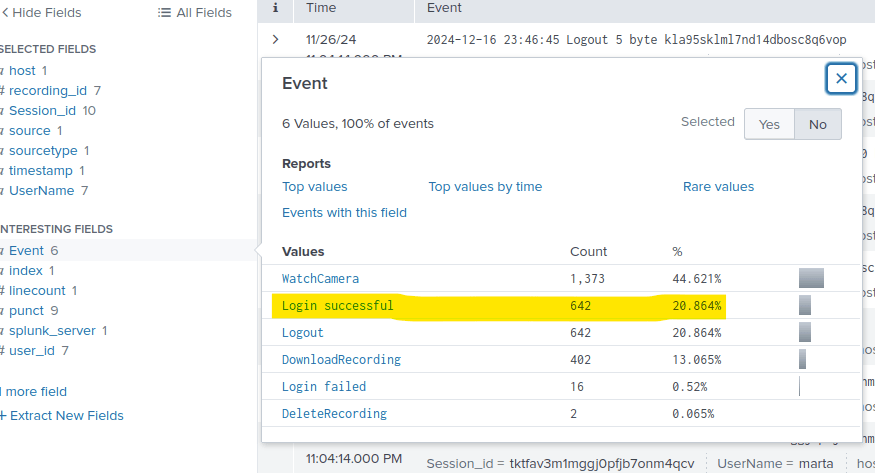
- Extract all the events from the cctv_feed logs. How many logs were captured associated with the successful login?
Answer: 642
Query: index=cctv_feed Event=”Login successful”
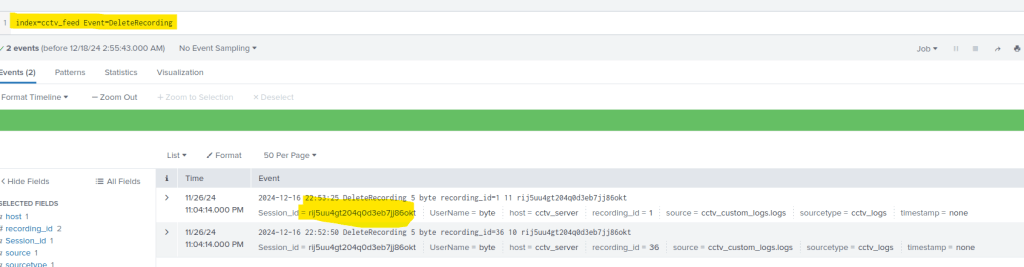
2. What is the Session_id associated with the attacker who deleted the recording?
Answer: rij5uu4gt204q0d3eb7jj86okt
Query: index=cctv_feed Event=DeleteRecording
3. What is the name of the attacker found in the logs, who deleted the CCTV footage?
Answer: mmalware

