The TryHackMe Windows Event Logs is a subscriber only room from TryHackMe and is part of the SOC Level 1 Learning path. It is available at: https://tryhackme.com/r/room/windowseventlogs
1.1 What is the Event ID for the earliest recorded event?
Answer: 40961

1.2 Filter on Event ID 4104. What was the 2nd command executed in the PowerShell session?
Answer: whoami

1.3 What is the Task Category for Event ID 4104?
Answer: Execute a Remote Command

1.4 Analyze the Windows PowerShell log. What is the Task Category for Event ID 800?
Answer: Pipeline Execution Details
2.1 How many log names are in the machine?
Answer: 1071
Run the Powershell command: wevtutil el | Measure-Object -Line
2.2 What event files would be read when using the query-events command?
Answer: event log, log file, structured query
Run the Powershell command: wevtutil qe /?

2.3 What option would you use to provide a path to a log file?
Answer: /lf:true
Run the Powershell command: wevtutil qe /?

2.4 What is the VALUE for /q?
Answer: Xpath query
Run the Powershell command: wevtutil qe /?

2.5 What is the log name?
Answer: Application
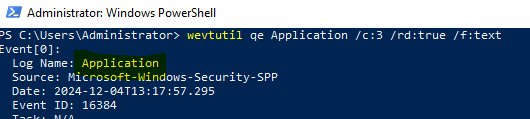
2.6 What is the /rd option for?
Answer: Event read direction
Run the Powershell command: wevtutil qe /?

2.7 What is the /c option for?
Answer: Maximum number of events to read
Run the Powershell command: wevtutil qe /?

3.1 Execute the command from Example 1 (as is). What are the names of the logs related to OpenSSH?
Answer: OpenSSH/Admin,OpenSSH/Operational

3.2 Execute the command from Example 8. Instead of the string Policy search for PowerShell. What is the name of the 3rd log provider?
Answer: Microsoft-Windows-PowerShell-DesiredStateConfiguration-FileDownloadManager
Run the PowerShell command: Get-WinEvent -ListProvider *Powershell*

3.3 Execute the command from Example 9. Use Microsoft-Windows-PowerShell as the log provider. How many event ids are displayed for this event provider?
Answer: 192
Run the PowerShell command: (Get-WinEvent -ListProvider Microsoft-Windows-PowerShell).Events | Format-Table Id, Descripti
on | Measure-Object -Line

3.4 How do you specify the number of events to display?
Answer: -MaxEvents

3.5 When using the FilterHashtable parameter and filtering by level, what is the value for Informational?
Answer: 4

4.1 Using the knowledge gained on Get-WinEvent and XPath, what is the query to find WLMS events with a System Time of 2020-12-15T01:09:08.940277500Z?
Answer: Get-WinEvent -LogName Application -FilterXPath ‘*/System/Provider[@Name=”WLMS”] and */System/TimeCreated[@SystemTime=”2020-12-15T01:09:08.940277500Z”]’
4.2 Using Get-WinEvent and XPath, what is the query to find a user named Sam with an Logon Event ID of 4720?
Answer: Get-WinEvent -Logname Security -FilterXPath ‘*/EventData/Data[@Name=”TargetUserName”]=”Sam” and */System/EventID=”4720″‘
4.3 Based on the previous query, how many results are returned?
Answer: 2

4.4 Based on the output from the question #2, what is Message?
Answer: A user account was created

4.5 Still working with Sam as the user, what time was Event ID 4724 recorded? (MM/DD/YYYY H:MM:SS [AM/PM])
Answer: 12/17/2020 1:57:14 PM

4.6 What is the Provider Name?
Answer: Microsoft-Windows-Security-Auditing
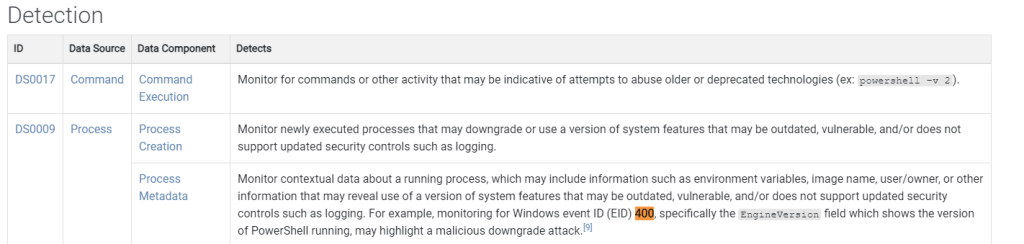
5.1 What event ID is to detect a PowerShell downgrade attack?
Answer: 400
See https://attack.mitre.org/techniques/T1562/010/
5.2 What is the Date and Time this attack took place? (MM/DD/YYYY H:MM:SS [AM/PM])
Answer: 12/18/2020 7:50:33 AM

5.3 A Log clear event was recorded. What is the ‘Event Record ID’?
Answer: 27736
From the PDF https://simontaplin.net/wp-content/uploads/2024/12/9dd2c-windowsloggingcheatsheet_ver_oct_2016.pdf
There are two Windows Event ID’s that can be used. 1102 and 104

5.4 What is the name of the computer?
Answer: PC01.example.corp

5.5 What is the name of the first variable within the PowerShell command?
Answer: $Va5w3n8
Powershell Command: Get-WinEvent -Path merged.evtx -FilterXPath ‘*/System/EventID=4104 and */EventData/Data[@Name=”ScriptBlockText”]’ | Format-List
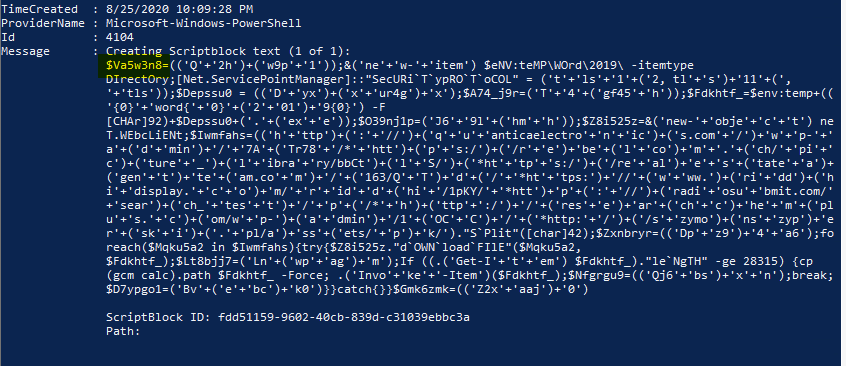
5.6 What is the Date and Time this attack took place? (MM/DD/YYYY H:MM:SS [AM/PM])
Answer: 8/25/2020 10:09:28 PM

5.7 What is the Execution Process ID?
Answer: 6620

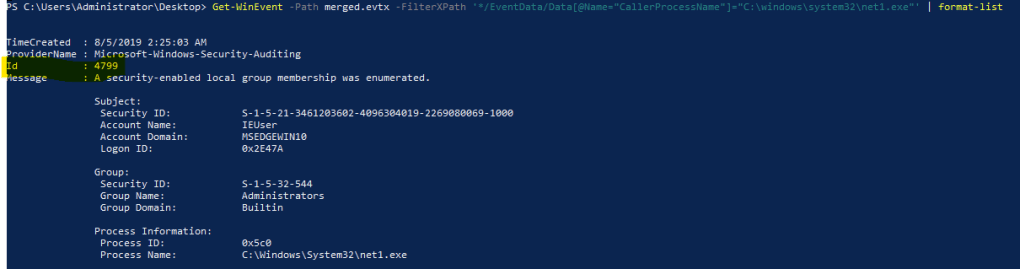
5.8 What is the Group Security ID of the group she enumerated?
Answer: S-1-5-32-544
Run the PowerShell command: Get-WinEvent -Path merged.evtx -FilterXPath ‘*/EventData/Data[@Name=”CallerProcessName”]=”C:\windows\system32\net1.exe”‘ | format-list
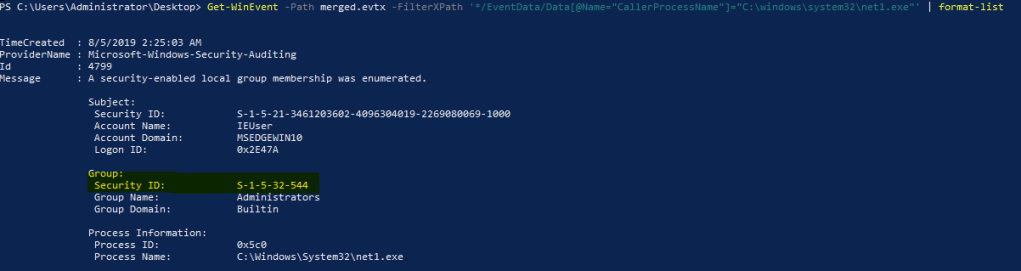
5.9 What is the Group Security ID of the group she enumerated?
Answer: 4799