

The TryHackMe Exchange Online Monitoring Room is a subscriber only room and future MAX subscriber only room that focuses on attacks on Exchange Online and monitoring using Splunk logs. The room is available at: https://tryhackme.com/room/exchangeonlinemonitoring
- Which attack stage involves sending phishing emails from a compromised account to other employees?
Answer: Lateral Movement
2.1 Which appDisplayName value confirms that a user accessed their Exchange Online mailbox?
Answer: One Outlook Web
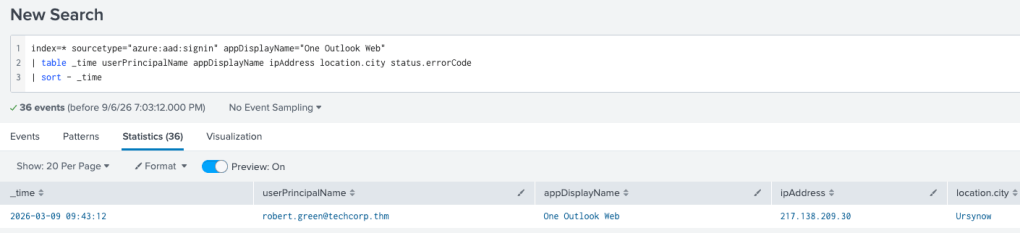
2.2 Which Exchange Online feature can attackers abuse to automatically delete replies to phishing emails?
Answer: New-InboxRule
3.1 A suspicious inbox rule was created by a user. What is the name of the rule that forwards emails to an external address?
Answer: Cleanup

3.2 What word does this forwarding inbox rule trigger on in the subject?
Answer: Verify

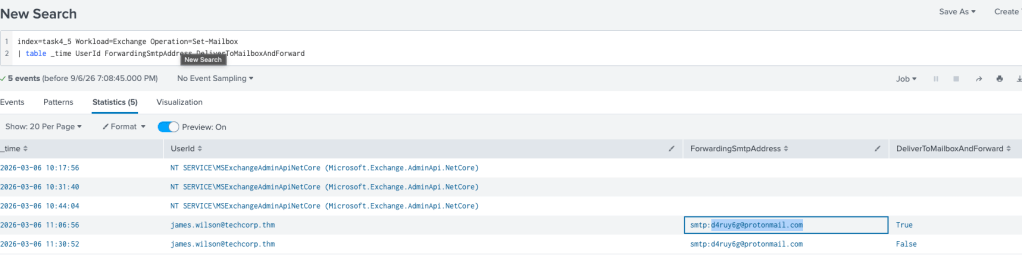
3.3 The same user configured mailbox-level email forwarding. To which external address were emails being forwarded?
Answer: d4ruy6g@protonmail.com
4.1 All TechCorp employees work from the same office network. A colleague reported receiving a suspicious email from an internal account. What was the subject line of this email?
Answer: Urgent: Verify Your Account
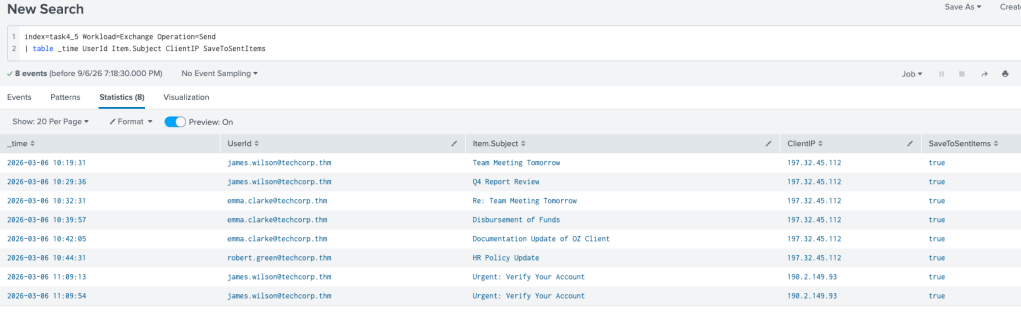
4.2 How many colleagues received the phishing email according to message trace?
Answer: 2

4.3 From which IP address were the suspicious emails sent?
Answer: 190.2.149.93

5.1 From which city was the malicious login performed?
Answer: Ursynow

5.2 What was the name of the suspicious inbox rule created by the attacker?
Answer: Maintenance

5.3 The attacker configured email forwarding. What was the email in ForwardingSmtpAddress?
Answer: x7tpq2m@protonmail.com

5.4 Robert’s colleagues received a phishing email. What was the subject line?
Answer: Action Required: Password Reset
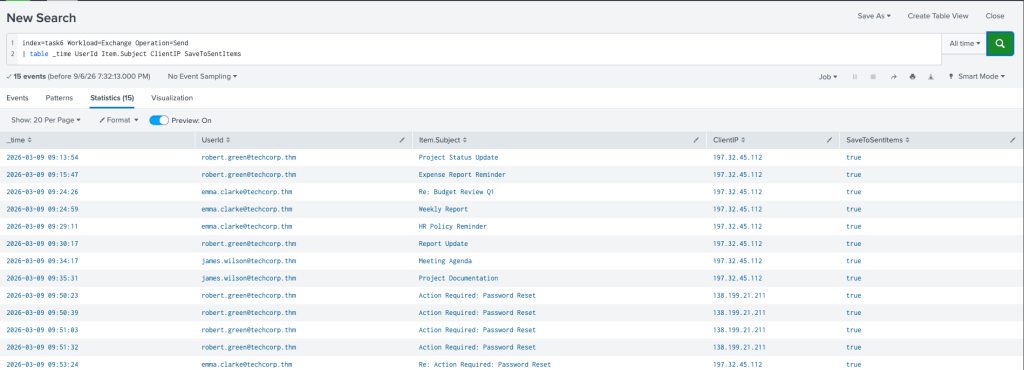
5.5 It seems the attacker was using a VPN. From which IP address did the attacker send the phishing emails?
Answer: 138.199.21.211

5.6 One of the recipients replied to the phishing email. Which user replied?
Answer: emma.clarke@techcorp.thm


