The TryHackMe Detecting Web Shells Room is a subscriber only room that explains the basics of how to detect if a web shell is installed on a machine by looking at logs, file systems and network traffic. The room is available at: https://tryhackme.com/room/detectingwebshells
1.1 Which MITRE ATT&CK Persistence sub-technique are web shells associated with?
Answer: T1505.003

1.2 What file extension is commonly used for web shells targeting Microsoft Exchange?
Answer: .aspx
2.1 Access the shell and determine which account you have access to by running the whoami command.
Answer: www-data

2.2 List the directory contents and find the flag using the ls and cat commands.
Answer: THM{W3b_Sh3ll_Usag3}

3.1 What is the part of the URL that associates values to parameters and can be a valuable indicator of web shell activity?
Answer: Query Strings
3.2 What auditd syscall would confirm that a file was written to disk following a suspicious POST request to /upload.php?
Answer: creat
4.1 What command would you use to locate .php files in the /var/www/ directory?
Answer: find /var/www -type f -name “*.php”
4.2 Which Wireshark filter would you use to search specifically for PUT requests?
Answer: http.request.method == “PUT”
5.1 Which IP address likely belongs to the attacker?
Answer: 203.0.113.66

5.2 What is the first directory that the attacker successfully identifies?
Answer: /wordpress

5.3 What is the name of the .php file the attacker uses to upload the web shell?
Answer: upload_form.php

5.4 What is the first command run by the attacker using the newly uploaded web shell?
Answer: whoami

5.5 After gaining access via the web shell, the attacker uses a command to download a second file onto the server. What is the name of this file?
Answer: linpeas.sh

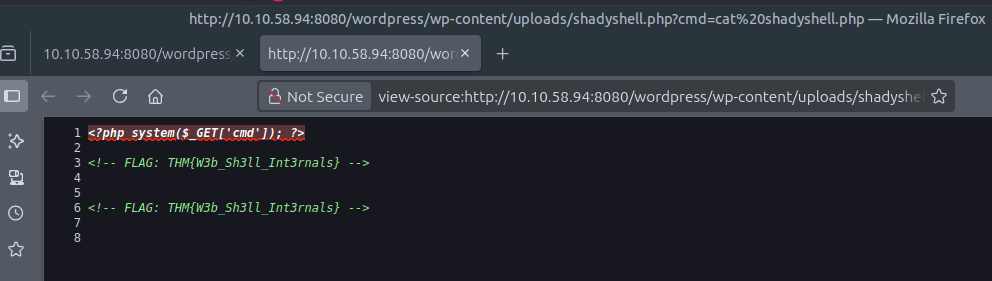
5.6 The attacker has hidden a secret within the web shell. Use cat to investigate the web shell code and find the flag.
Answer: THM{W3b_Sh3ll_Int3rnals}
In the Browser: browse to: http://SERVER-IP:8080/wordpress/wp-content/uploads/shadyshell.php?cmd=cat%20shadyshell.php