The Answers for the TryHackMe Windows Network Analysis Room is a subscriber only room that teaches the basics of looking for artefacts of a compromise of a Windows based machine through the network. The room is available at: https://tryhackme.com/room/windowsnetworkanalysis
1.1 What is the full name of the Windows feature that tracks the last 30 to 60 days of system statistics?
Answer: System Resource Usage Monitor
1.2 What is the full path to the directory that Windows will output Firewall logs to?
Answer: C:\Windows\System32\LogFiles\Firewall\pfirewall.log
2.1 What cmdlet can be used to display active TCP connections?
Answer:Get-NetTCPConnection
2.2 What cmdlet can be used to display the DNS cache on the host?
Answer: Get-DnsClientCache
2.3 What command can be used to list all active RDP sessions on the host?
Answer: qwinsta
3.1 What netstat flag can we use to display the executable responsible for a connection?
Answer: -b
3.2 If we wanted to display all TCP connections and the associated process ID using netstat, what flag would we use?
Answer: -o
3.3 What special character can we use to save the output of netstat to a text file?
Answer: >
4.1 Use the Get-NetTCPConnection PowerShell cmdlet to list the connections currently active. A popular port for reverse shells is currently active. What is the port number?
Answer: 4444
4.2 What is the name of the process that is connecting to the C2 server?
Answer: pythonw.exe


4.3 What is the domain that has been added to the workstation’s host file?
Answer: attackerc2.thm

4.4 Analyse the SRUM database. There is another process that has sent a large amount of bytes, indicating data exfil. What is the full path to the process (as listed in SRUM)?
Answer: \device\harddiskvolume3\program files\updater\exfil.exe

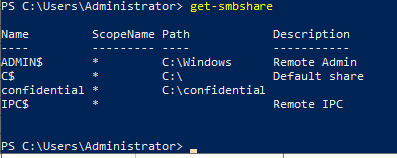
4.5 Finally, analyse the SMB shares present on the analyst machine. What is the name of the share that stands out?
Answer: confidential